In a past life I was a balsamiq user. I loved a quick way to mockup a design with a set of common controls. There are many other tools you can do this with.
Not sure how much need there would be for an MS Access version but thought why not give it a go.
I used GitHub Copilot to build the app with the following prompt:
Build a Microsoft Access VBA Form Builder as a website using the 98.css theme.
https://jdan.github.io/98.css/
https://unpkg.com/98.css@0.1.21/dist/98.css
With the additional prompts
add and import and export option
To test this out I've take a CustomerF from the 599CD Blank Template.
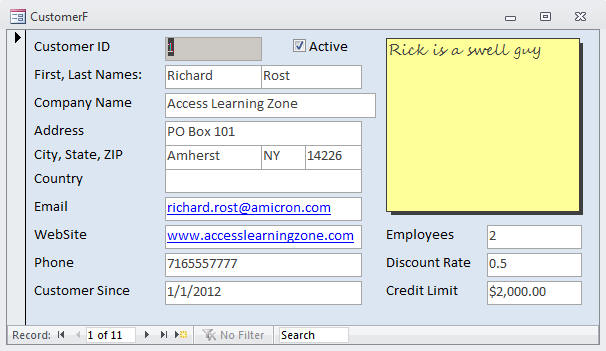
Then I've created the same Form with the new tool to see how it looks:
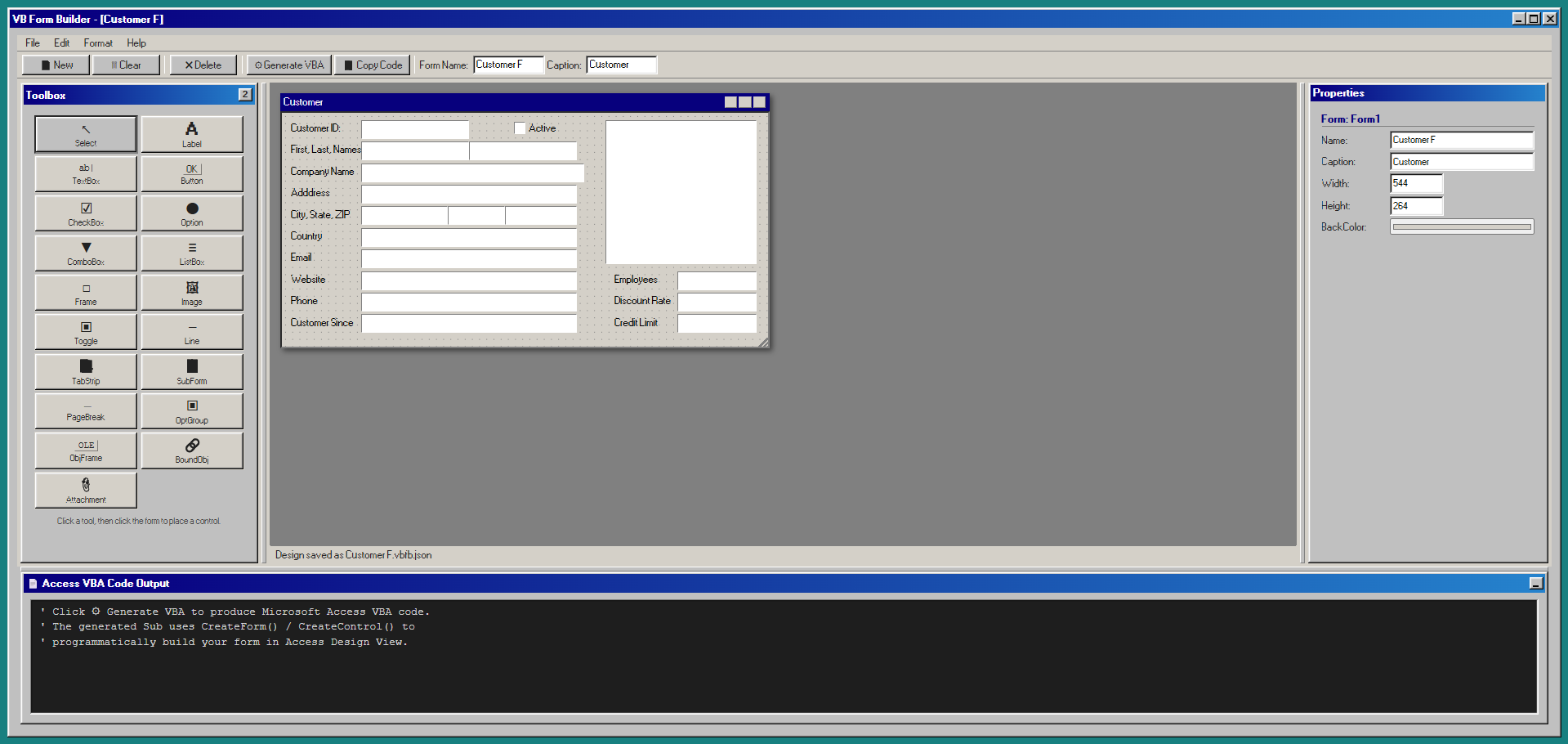
It created a number of controls originally, then I asked it to add more:
  // Access VBA control-type constants
  const AC = {
    Label:            { vba: 'acLabel',            n: 100 },
    TextBox:          { vba: 'acTextBox',          n: 109 },
    CommandButton:    { vba: 'acCommandButton',    n: 104 },
    CheckBox:         { vba: 'acCheckBox',         n: 106 },
    OptionButton:     { vba: 'acOptionButton',     n: 105 },
    ComboBox:         { vba: 'acComboBox',         n: 111 },
    ListBox:          { vba: 'acListBox',          n: 110 },
    Frame:            { vba: 'acRectangle',        n: 101 },
    Image:            { vba: 'acImage',            n: 103 },
    ToggleButton:     { vba: 'acToggleButton',     n: 122 },
    Line:             { vba: 'acLine',             n: 102 },
    TabStrip:         { vba: 'acTabCtl',           n: 123 },
    SubForm:          { vba: 'acSubForm',          n: 112 },
    PageBreak:        { vba: 'acPageBreak',        n: 118 },
    OptionGroup:      { vba: 'acOptionGroup',      n: 107 },
    ObjectFrame:      { vba: 'acObjectFrame',      n: 114 },
    BoundObjectFrame: { vba: 'acBoundObjectFrame', n: 108 },
    Attachment:       { vba: 'acAttachment',       n: 126 },
  };
A few more prompts were asked:
Allow the toolbox to be 1 or 2 columns
You can minimise but not restore the code output panel
The main Form isn't resizable, you can't drag the corner. When you change the width and height properties it doesn't resize the Form.
Allow for the different panels to be adjustable.
It worked really for a majority of the work. There are still some tweaks I need to make but as an initial app it does more than what I needed or had in my head before I began.
The Import / Export and Save Code option were really cool additions.
Code Output
Customer F.vbfb.json
{
  "_version": 1,
  "_app": "VB Form Builder",
  "form": {
    "name": "Customer F",
    "caption": "Customer",
    "width": 544,
    "height": 264,
    "backColor": "#d4d0c8"
  },
  "controls": [
    {
      "id": "_c781thv",
      "type": "TextBox",
      "name": "CustomerID",
      "left": 88,
      "top": 8,
      "width": 120,
      "height": 21,
      "visible": true,
      "enabled": true,
      "fontSize": 8,
      "fontBold": false,
      "fontItalic": false,
      "foreColor": "#000000",
      "text": "",
      "backColor": "#ffffff"
    },
    {
      "id": "_hs98uso",
      "type": "TextBox",
      "name": "First",
      "left": 88,
      "top": 32,
      "width": 120,
      "height": 21,
      "visible": true,
      "enabled": true,
      "fontSize": 8,
      "fontBold": false,
      "fontItalic": false,
      "foreColor": "#000000",
      "text": "",
      "backColor": "#ffffff"
    },
    {
      "id": "_4q66qws",
      "type": "TextBox",
      "name": "Last",
      "left": 208,
      "top": 32,
      "width": 120,
      "height": 21,
      "visible": true,
      "enabled": true,
      "fontSize": 8,
      "fontBold": false,
      "fontItalic": false,
      "foreColor": "#000000",
      "text": "",
      "backColor": "#ffffff"
    },
    {
      "id": "_8q2kiag",
      "type": "TextBox",
      "name": "CompanyName",
      "left": 88,
      "top": 56,
      "width": 248,
      "height": 21,
      "visible": true,
      "enabled": true,
      "fontSize": 8,
      "fontBold": false,
      "fontItalic": false,
      "foreColor": "#000000",
      "text": "",
      "backColor": "#ffffff"
    },
    {
      "id": "_2k62j39",
      "type": "CheckBox",
      "name": "Check1",
      "left": 256,
      "top": 8,
      "width": 72,
      "height": 18,
      "visible": true,
      "enabled": true,
      "fontSize": 8,
      "fontBold": false,
      "fontItalic": false,
      "foreColor": "#000000",
      "caption": "Active"
    },
    {
      "id": "_3xz8l9h",
      "type": "TextBox",
      "name": "Address",
      "left": 88,
      "top": 80,
      "width": 240,
      "height": 21,
      "visible": true,
      "enabled": true,
      "fontSize": 8,
      "fontBold": false,
      "fontItalic": false,
      "foreColor": "#000000",
      "text": "",
      "backColor": "#ffffff"
    },
    {
      "id": "_5175abg",
      "type": "TextBox",
      "name": "State",
      "left": 184,
      "top": 104,
      "width": 64,
      "height": 21,
      "visible": true,
      "enabled": true,
      "fontSize": 8,
      "fontBold": false,
      "fontItalic": false,
      "foreColor": "#000000",
      "text": "",
      "backColor": "#ffffff"
    },
    {
      "id": "_ks2n5x9",
      "type": "TextBox",
      "name": "City",
      "left": 88,
      "top": 104,
      "width": 96,
      "height": 21,
      "visible": true,
      "enabled": true,
      "fontSize": 8,
      "fontBold": false,
      "fontItalic": false,
      "foreColor": "#000000",
      "text": "",
      "backColor": "#ffffff"
    },
    {
      "id": "_er8y4rr",
      "type": "TextBox",
      "name": "ZIP",
      "left": 248,
      "top": 104,
      "width": 80,
      "height": 21,
      "visible": true,
      "enabled": true,
      "fontSize": 8,
      "fontBold": false,
      "fontItalic": false,
      "foreColor": "#000000",
      "text": "",
      "backColor": "#ffffff"
    },
    {
      "id": "_8nt7gpy",
      "type": "TextBox",
      "name": "Country",
      "left": 88,
      "top": 128,
      "width": 240,
      "height": 21,
      "visible": true,
      "enabled": true,
      "fontSize": 8,
      "fontBold": false,
      "fontItalic": false,
      "foreColor": "#000000",
      "text": "",
      "backColor": "#ffffff"
    },
    {
      "id": "_g4gqyex",
      "type": "TextBox",
      "name": "Email",
      "left": 88,
      "top": 152,
      "width": 240,
      "height": 21,
      "visible": true,
      "enabled": true,
      "fontSize": 8,
      "fontBold": false,
      "fontItalic": false,
      "foreColor": "#000000",
      "text": "",
      "backColor": "#ffffff"
    },
    {
      "id": "_xq0w79g",
      "type": "TextBox",
      "name": "Website",
      "left": 88,
      "top": 176,
      "width": 240,
      "height": 21,
      "visible": true,
      "enabled": true,
      "fontSize": 8,
      "fontBold": false,
      "fontItalic": false,
      "foreColor": "#000000",
      "text": "",
      "backColor": "#ffffff"
    },
    {
      "id": "_n35gvys",
      "type": "TextBox",
      "name": "Phone",
      "left": 88,
      "top": 200,
      "width": 240,
      "height": 21,
      "visible": true,
      "enabled": true,
      "fontSize": 8,
      "fontBold": false,
      "fontItalic": false,
      "foreColor": "#000000",
      "text": "",
      "backColor": "#ffffff"
    },
    {
      "id": "_32kp3r9",
      "type": "TextBox",
      "name": "CustomerSince",
      "left": 88,
      "top": 224,
      "width": 240,
      "height": 21,
      "visible": true,
      "enabled": true,
      "fontSize": 8,
      "fontBold": false,
      "fontItalic": false,
      "foreColor": "#000000",
      "text": "",
      "backColor": "#ffffff"
    },
    {
      "id": "_i9vneir",
      "type": "Label",
      "name": "Label1",
      "left": 8,
      "top": 8,
      "width": 80,
      "height": 18,
      "visible": true,
      "enabled": true,
      "fontSize": 8,
      "fontBold": false,
      "fontItalic": false,
      "foreColor": "#000000",
      "caption": "Customer ID:"
    },
    {
      "id": "_11whonp",
      "type": "Label",
      "name": "Label2",
      "left": 8,
      "top": 32,
      "width": 80,
      "height": 18,
      "visible": true,
      "enabled": true,
      "fontSize": 8,
      "fontBold": false,
      "fontItalic": false,
      "foreColor": "#000000",
      "caption": "First, Last, Names:"
    },
    {
      "id": "_qzvc20v",
      "type": "Label",
      "name": "Label3",
      "left": 8,
      "top": 56,
      "width": 80,
      "height": 18,
      "visible": true,
      "enabled": true,
      "fontSize": 8,
      "fontBold": false,
      "fontItalic": false,
      "foreColor": "#000000",
      "caption": "Company Name"
    },
    {
      "id": "_eto8nap",
      "type": "Label",
      "name": "Label4",
      "left": 8,
      "top": 80,
      "width": 80,
      "height": 18,
      "visible": true,
      "enabled": true,
      "fontSize": 8,
      "fontBold": false,
      "fontItalic": false,
      "foreColor": "#000000",
      "caption": "Adddress"
    },
    {
      "id": "_ljj8txa",
      "type": "Label",
      "name": "Label5",
      "left": 8,
      "top": 104,
      "width": 80,
      "height": 18,
      "visible": true,
      "enabled": true,
      "fontSize": 8,
      "fontBold": false,
      "fontItalic": false,
      "foreColor": "#000000",
      "caption": "City, State, ZIP"
    },
    {
      "id": "_613df84",
      "type": "Label",
      "name": "Label6",
      "left": 8,
      "top": 128,
      "width": 80,
      "height": 18,
      "visible": true,
      "enabled": true,
      "fontSize": 8,
      "fontBold": false,
      "fontItalic": false,
      "foreColor": "#000000",
      "caption": "Country"
    },
    {
      "id": "_oo6m3uo",
      "type": "Label",
      "name": "Label7",
      "left": 8,
      "top": 152,
      "width": 80,
      "height": 18,
      "visible": true,
      "enabled": true,
      "fontSize": 8,
      "fontBold": false,
      "fontItalic": false,
      "foreColor": "#000000",
      "caption": "Email"
    },
    {
      "id": "_vxbg61c",
      "type": "Label",
      "name": "Label8",
      "left": 8,
      "top": 176,
      "width": 80,
      "height": 18,
      "visible": true,
      "enabled": true,
      "fontSize": 8,
      "fontBold": false,
      "fontItalic": false,
      "foreColor": "#000000",
      "caption": "Website"
    },
    {
      "id": "_qsl0gqg",
      "type": "Label",
      "name": "Label9",
      "left": 8,
      "top": 200,
      "width": 80,
      "height": 18,
      "visible": true,
      "enabled": true,
      "fontSize": 8,
      "fontBold": false,
      "fontItalic": false,
      "foreColor": "#000000",
      "caption": "Phone"
    },
    {
      "id": "_3bxqrg1",
      "type": "Label",
      "name": "Label10",
      "left": 8,
      "top": 224,
      "width": 80,
      "height": 18,
      "visible": true,
      "enabled": true,
      "fontSize": 8,
      "fontBold": false,
      "fontItalic": false,
      "foreColor": "#000000",
      "caption": "Customer Since"
    },
    {
      "id": "_snbv7o7",
      "type": "TextBox",
      "name": "Employees",
      "left": 440,
      "top": 176,
      "width": 88,
      "height": 21,
      "visible": true,
      "enabled": true,
      "fontSize": 8,
      "fontBold": false,
      "fontItalic": false,
      "foreColor": "#000000",
      "text": "",
      "backColor": "#ffffff"
    },
    {
      "id": "_r38w8jj",
      "type": "Label",
      "name": "Label11",
      "left": 368,
      "top": 176,
      "width": 64,
      "height": 18,
      "visible": true,
      "enabled": true,
      "fontSize": 8,
      "fontBold": false,
      "fontItalic": false,
      "foreColor": "#000000",
      "caption": "Employees"
    },
    {
      "id": "_f5xfpfp",
      "type": "TextBox",
      "name": "DiscountRate",
      "left": 440,
      "top": 200,
      "width": 88,
      "height": 21,
      "visible": true,
      "enabled": true,
      "fontSize": 8,
      "fontBold": false,
      "fontItalic": false,
      "foreColor": "#000000",
      "text": "",
      "backColor": "#ffffff"
    },
    {
      "id": "_cz9zpwg",
      "type": "Label",
      "name": "Label12",
      "left": 368,
      "top": 200,
      "width": 72,
      "height": 18,
      "visible": true,
      "enabled": true,
      "fontSize": 8,
      "fontBold": false,
      "fontItalic": false,
      "foreColor": "#000000",
      "caption": "Discount Rate"
    },
    {
      "id": "_wnij37q",
      "type": "TextBox",
      "name": "CreditLimit",
      "left": 440,
      "top": 224,
      "width": 88,
      "height": 21,
      "visible": true,
      "enabled": true,
      "fontSize": 8,
      "fontBold": false,
      "fontItalic": false,
      "foreColor": "#000000",
      "text": "",
      "backColor": "#ffffff"
    },
    {
      "id": "_b8w401v",
      "type": "Label",
      "name": "Label13",
      "left": 368,
      "top": 224,
      "width": 64,
      "height": 18,
      "visible": true,
      "enabled": true,
      "fontSize": 8,
      "fontBold": false,
      "fontItalic": false,
      "foreColor": "#000000",
      "caption": "Credit Limit"
    },
    {
      "id": "_ab9btu3",
      "type": "TextBox",
      "name": "Notes",
      "left": 360,
      "top": 8,
      "width": 168,
      "height": 160,
      "visible": true,
      "enabled": true,
      "fontSize": 8,
      "fontBold": false,
      "fontItalic": false,
      "foreColor": "#000000",
      "text": "",
      "backColor": "#ffff00"
    }
  ],
  "counters": {
    "TextBox": 17,
    "CheckBox": 1,
    "Label": 13
  }
}
Customer F_VBA.bas
' ========================================================
' VB Form Builder — Generated Microsoft Access VBA Code
' Form   : Customer F
' Caption: Customer
' Created: Apr 2, 2026
' ========================================================
'
' HOW TO USE:
'   1. Open your Access database.
'   2. Press Alt+F11 to open the VBA editor.
'   3. Insert > Module, paste this code, then run CreateForm_Customer F().
' ========================================================

Option Explicit

Sub CreateForm_Customer F()
    Dim frm  As Form
    Dim ctrl As Control

    ' ---- Create the form ----
    Set frm = CreateForm()
    frm.Caption = "Customer"

    ' ---- Controls ----
    ' CustomerID (TextBox)
    Set ctrl = CreateControl(frm.Name, acTextBox, acDetail, , "CustomerID", 1320, 120, 1800, 315)

    ' First (TextBox)
    Set ctrl = CreateControl(frm.Name, acTextBox, acDetail, , "First", 1320, 480, 1800, 315)

    ' Last (TextBox)
    Set ctrl = CreateControl(frm.Name, acTextBox, acDetail, , "Last", 3120, 480, 1800, 315)

    ' CompanyName (TextBox)
    Set ctrl = CreateControl(frm.Name, acTextBox, acDetail, , "CompanyName", 1320, 840, 3720, 315)

    ' Check1 (CheckBox)
    Set ctrl = CreateControl(frm.Name, acCheckBox, acDetail, , "Check1", 3840, 120, 1080, 270)
    ctrl.Caption = "Active"

    ' Address (TextBox)
    Set ctrl = CreateControl(frm.Name, acTextBox, acDetail, , "Address", 1320, 1200, 3600, 315)

    ' State (TextBox)
    Set ctrl = CreateControl(frm.Name, acTextBox, acDetail, , "State", 2760, 1560, 960, 315)

    ' City (TextBox)
    Set ctrl = CreateControl(frm.Name, acTextBox, acDetail, , "City", 1320, 1560, 1440, 315)

    ' ZIP (TextBox)
    Set ctrl = CreateControl(frm.Name, acTextBox, acDetail, , "ZIP", 3720, 1560, 1200, 315)

    ' Country (TextBox)
    Set ctrl = CreateControl(frm.Name, acTextBox, acDetail, , "Country", 1320, 1920, 3600, 315)

    ' Email (TextBox)
    Set ctrl = CreateControl(frm.Name, acTextBox, acDetail, , "Email", 1320, 2280, 3600, 315)

    ' Website (TextBox)
    Set ctrl = CreateControl(frm.Name, acTextBox, acDetail, , "Website", 1320, 2640, 3600, 315)

    ' Phone (TextBox)
    Set ctrl = CreateControl(frm.Name, acTextBox, acDetail, , "Phone", 1320, 3000, 3600, 315)

    ' CustomerSince (TextBox)
    Set ctrl = CreateControl(frm.Name, acTextBox, acDetail, , "CustomerSince", 1320, 3360, 3600, 315)

    ' Label1 (Label)
    Set ctrl = CreateControl(frm.Name, acLabel, acDetail, , "Label1", 120, 120, 1200, 270)
    ctrl.Caption = "Customer ID:"

    ' Label2 (Label)
    Set ctrl = CreateControl(frm.Name, acLabel, acDetail, , "Label2", 120, 480, 1200, 270)
    ctrl.Caption = "First, Last, Names:"

    ' Label3 (Label)
    Set ctrl = CreateControl(frm.Name, acLabel, acDetail, , "Label3", 120, 840, 1200, 270)
    ctrl.Caption = "Company Name"

    ' Label4 (Label)
    Set ctrl = CreateControl(frm.Name, acLabel, acDetail, , "Label4", 120, 1200, 1200, 270)
    ctrl.Caption = "Adddress"

    ' Label5 (Label)
    Set ctrl = CreateControl(frm.Name, acLabel, acDetail, , "Label5", 120, 1560, 1200, 270)
    ctrl.Caption = "City, State, ZIP"

    ' Label6 (Label)
    Set ctrl = CreateControl(frm.Name, acLabel, acDetail, , "Label6", 120, 1920, 1200, 270)
    ctrl.Caption = "Country"

    ' Label7 (Label)
    Set ctrl = CreateControl(frm.Name, acLabel, acDetail, , "Label7", 120, 2280, 1200, 270)
    ctrl.Caption = "Email"

    ' Label8 (Label)
    Set ctrl = CreateControl(frm.Name, acLabel, acDetail, , "Label8", 120, 2640, 1200, 270)
    ctrl.Caption = "Website"

    ' Label9 (Label)
    Set ctrl = CreateControl(frm.Name, acLabel, acDetail, , "Label9", 120, 3000, 1200, 270)
    ctrl.Caption = "Phone"

    ' Label10 (Label)
    Set ctrl = CreateControl(frm.Name, acLabel, acDetail, , "Label10", 120, 3360, 1200, 270)
    ctrl.Caption = "Customer Since"

    ' Employees (TextBox)
    Set ctrl = CreateControl(frm.Name, acTextBox, acDetail, , "Employees", 6600, 2640, 1320, 315)

    ' Label11 (Label)
    Set ctrl = CreateControl(frm.Name, acLabel, acDetail, , "Label11", 5520, 2640, 960, 270)
    ctrl.Caption = "Employees"

    ' DiscountRate (TextBox)
    Set ctrl = CreateControl(frm.Name, acTextBox, acDetail, , "DiscountRate", 6600, 3000, 1320, 315)

    ' Label12 (Label)
    Set ctrl = CreateControl(frm.Name, acLabel, acDetail, , "Label12", 5520, 3000, 1080, 270)
    ctrl.Caption = "Discount Rate"

    ' CreditLimit (TextBox)
    Set ctrl = CreateControl(frm.Name, acTextBox, acDetail, , "CreditLimit", 6600, 3360, 1320, 315)

    ' Label13 (Label)
    Set ctrl = CreateControl(frm.Name, acLabel, acDetail, , "Label13", 5520, 3360, 960, 270)
    ctrl.Caption = "Credit Limit"

    ' Notes (TextBox)
    Set ctrl = CreateControl(frm.Name, acTextBox, acDetail, , "Notes", 5400, 120, 2520, 2400)
    ctrl.BackColor = RGB(255, 255, 0)

    ' ---- Save & close ----
    DoCmd.Save acForm, frm.Name
    DoCmd.Close acForm, frm.Name, acSaveYes
    MsgBox "Form '" & frm.Name & "' created successfully!", vbInformation
End Sub

' ========================================================
' Event-handler stubs
' (Paste these into your form's code module in Access)
' ========================================================

Private Sub CustomerID_Change()
    ' TODO: handle CustomerID change
End Sub

Private Sub CustomerID_BeforeUpdate(Cancel As Integer)
    ' TODO: validate CustomerID
End Sub

Private Sub First_Change()
    ' TODO: handle First change
End Sub

Private Sub First_BeforeUpdate(Cancel As Integer)
    ' TODO: validate First
End Sub

Private Sub Last_Change()
    ' TODO: handle Last change
End Sub

Private Sub Last_BeforeUpdate(Cancel As Integer)
    ' TODO: validate Last
End Sub

Private Sub CompanyName_Change()
    ' TODO: handle CompanyName change
End Sub

Private Sub CompanyName_BeforeUpdate(Cancel As Integer)
    ' TODO: validate CompanyName
End Sub

Private Sub Check1_Click()
    ' TODO: handle Check1 toggle
    ' Me.Check1 = True or False
End Sub

Private Sub Address_Change()
    ' TODO: handle Address change
End Sub

Private Sub Address_BeforeUpdate(Cancel As Integer)
    ' TODO: validate Address
End Sub

Private Sub State_Change()
    ' TODO: handle State change
End Sub

Private Sub State_BeforeUpdate(Cancel As Integer)
    ' TODO: validate State
End Sub

Private Sub City_Change()
    ' TODO: handle City change
End Sub

Private Sub City_BeforeUpdate(Cancel As Integer)
    ' TODO: validate City
End Sub

Private Sub ZIP_Change()
    ' TODO: handle ZIP change
End Sub

Private Sub ZIP_BeforeUpdate(Cancel As Integer)
    ' TODO: validate ZIP
End Sub

Private Sub Country_Change()
    ' TODO: handle Country change
End Sub

Private Sub Country_BeforeUpdate(Cancel As Integer)
    ' TODO: validate Country
End Sub

Private Sub Email_Change()
    ' TODO: handle Email change
End Sub

Private Sub Email_BeforeUpdate(Cancel As Integer)
    ' TODO: validate Email
End Sub

Private Sub Website_Change()
    ' TODO: handle Website change
End Sub

Private Sub Website_BeforeUpdate(Cancel As Integer)
    ' TODO: validate Website
End Sub

Private Sub Phone_Change()
    ' TODO: handle Phone change
End Sub

Private Sub Phone_BeforeUpdate(Cancel As Integer)
    ' TODO: validate Phone
End Sub

Private Sub CustomerSince_Change()
    ' TODO: handle CustomerSince change
End Sub

Private Sub CustomerSince_BeforeUpdate(Cancel As Integer)
    ' TODO: validate CustomerSince
End Sub

Private Sub Employees_Change()
    ' TODO: handle Employees change
End Sub

Private Sub Employees_BeforeUpdate(Cancel As Integer)
    ' TODO: validate Employees
End Sub

Private Sub DiscountRate_Change()
    ' TODO: handle DiscountRate change
End Sub

Private Sub DiscountRate_BeforeUpdate(Cancel As Integer)
    ' TODO: validate DiscountRate
End Sub

Private Sub CreditLimit_Change()
    ' TODO: handle CreditLimit change
End Sub

Private Sub CreditLimit_BeforeUpdate(Cancel As Integer)
    ' TODO: validate CreditLimit
End Sub

Private Sub Notes_Change()
    ' TODO: handle Notes change
End Sub

Private Sub Notes_BeforeUpdate(Cancel As Integer)
    ' TODO: validate Notes
End Sub

Private Sub Form_Open(Cancel As Integer)
    ' TODO: initialize form
End Sub

Private Sub Form_Close()
    ' TODO: clean up
End Sub
Site
I've deployed this via Rick's PC Resale website as it's Access related and linked to 599CD.